

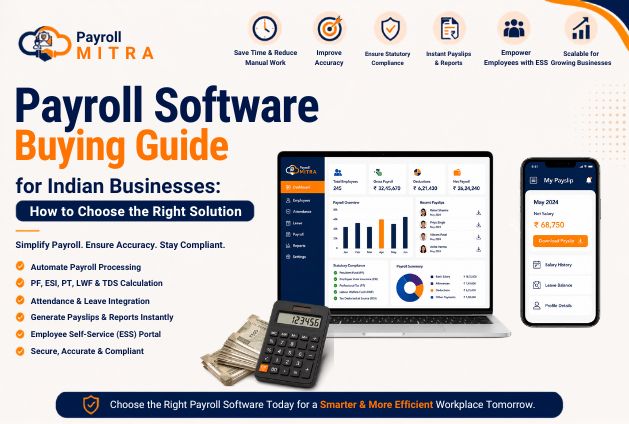
Managing payroll is one of the most important responsibilities for any business. Every month, employers need to calculate salaries accurately, process statutory deductions, generate payslips, and maintain payroll records. While manual payroll may work for a small team, it becomes increasingly difficult as the business grows.
Using spreadsheets for payroll mitra often leads to calculation errors, duplicate work, delayed salary processing, and difficulty managing attendance and leave data. These challenges not only consume valuable HR time but can also affect employee satisfaction.
Payroll software helps businesses simplify and automate payroll processing. Payroll software streamlines salary processing by minimizing repetitive tasks, improving calculation accuracy, and keeping payroll records organized in one place. However, with many payroll solutions available in the market, choosing the right one requires careful evaluation.
What Is Payroll Software?
Payroll software is a digital solution that helps businesses automate salary processing and manage payroll-related activities from a single platform. Instead of relying on manual calculations or spreadsheets, payroll software processes salaries based on employee data, attendance, leave records, salary structures, and statutory deductions.
A typical payroll system can help businesses:
- Calculate employee salaries
- Process payroll automatically
- Calculate PF, ESI, PT, LWF, and TDS
- Generate payslips
- Maintain payroll records
- Generate payroll reports
How Does Payroll Software Work?
Although features vary from one solution to another, the payroll process generally follows these steps:
- Employee details and salary structures are configured.
- Attendance and leave records are updated.
- Salary components and deductions are calculated automatically.
- Statutory contributions are processed based on configured settings.
- Payslips and payroll reports are generated.
- Payroll is finalized for salary disbursement.
By automating these repetitive tasks, payroll software reduces manual work and helps businesses process salaries more efficiently.
Why Businesses Need Payroll Software
Payroll is more than paying salaries on time. It also involves maintaining accurate records, processing statutory deductions, and managing employee payroll information efficiently.
Here are some of the biggest benefits of using payroll software.
1. Saves Time and Reduces Manual Work
Processing payroll manually involves multiple tasks such as attendance verification, leave calculations, salary computation, statutory deductions, and payslip preparation.
Payroll software automates these activities, allowing HR teams to complete payroll much faster while reducing repetitive work.
2. Improves Payroll Accuracy
Manual payroll increases the possibility of:
- Incorrect salary calculations
- Formula errors in spreadsheets
- Duplicate entries
- Incorrect deductions
Payroll software performs calculations based on predefined payroll rules, helping reduce human errors and improve payroll accuracy.
3. Simplifies Payroll Compliance
Payroll processing often includes statutory deductions such as:
- Provident Fund (PF)
- Employee State Insurance (ESI)
- Professional Tax (PT)
- Labour Welfare Fund (LWF)
- Tax Deducted at Source (TDS)
Payroll software helps automate these calculations according to configured payroll settings, reducing manual effort and improving consistency.
4. Generates Payslips and Reports Quickly
Preparing payslips and payroll reports manually every month takes considerable time.
Payroll software generates professional payslips and payroll reports within minutes, making payroll management more organized and efficient.
Signs Your Business Needs Payroll Software
Many businesses continue using manual payroll because it has worked for them in the past. However, as operations grow, manual processes become difficult to manage.
If you experience any of the following situations, it may be time to invest in payroll software.
You’re Still Managing Payroll in Excel
Using multiple spreadsheets for salary calculations can increase the chances of errors and make payroll processing more time-consuming.
Payroll Takes Too Long Every Month
If your HR or finance team spends several hours—or even days—processing salaries every month, payroll automation can significantly reduce the workload.
Salary Errors Are Becoming Common
Frequent payroll corrections, employee complaints, or incorrect deductions are clear signs that manual payroll is no longer efficient.
Attendance and Payroll Are Managed Separately
When attendance, leave, and payroll are maintained in different systems, HR teams often need to transfer data manually.
Payroll software with attendance and leave integration helps streamline this process.
Payroll Reports Are Difficult to Prepare
If creating salary registers, deduction reports, or monthly payroll summaries requires manual effort every month, payroll software can simplify report generation and improve record management.
Your Business Is Growing
A payroll process that works for 10 employees may not be suitable for 100 employees. As your workforce expands, payroll becomes more complex.
Investing in payroll software early helps businesses scale efficiently while maintaining payroll accuracy and consistency.
Types of Payroll Software
Choosing the right payroll software starts with understanding the different options available. Every business has unique payroll requirements, so selecting software that aligns with your operations is essential.
1. Standalone Payroll Software
Standalone payroll software focuses only on payroll processing. It helps businesses calculate salaries, generate payslips, process statutory deductions, and create payroll reports.
Best For:
- Small businesses
- Businesses with basic payroll requirements
Pros
- Easy to use
- Quick implementation
- Cost-effective
Limitations
- Limited HR functionality
- May require separate attendance or leave systems
2. Payroll + HRMS Software
A Payroll + HRMS solution combines payroll with essential HR functions such as attendance management, leave management, employee records, and reporting.
Instead of managing multiple applications, businesses can handle HR and payroll from a single platform.
Best For:
- Startups
- SMEs
- Growing organizations
Pros
- Centralized employee data
- Better HR and payroll coordination
- Reduced manual work
- Improved reporting
3. Cloud-Based Payroll Software
Cloud-based payroll software is hosted online, allowing businesses to access payroll information securely from anywhere.
Since there is no need to maintain servers or install software on multiple computers, cloud solutions are becoming the preferred choice for modern businesses.
Best For:
- Startups
- SMEs
- Businesses with multiple branches
- Remote and hybrid teams
Pros
- Access from anywhere
- Automatic software updates
- Easy scalability
- Lower IT maintenance
- Secure cloud storage
Payroll Software Comparison
| Type | Best For | Key Benefit |
| Standalone Payroll Software | Small Businesses | Simple payroll processing |
| Payroll + HRMS Software | Growing Businesses | HR & Payroll in one platform |
| Cloud-Based Payroll Software | SMEs & Multi-location Businesses | Flexible and scalable |
Must-Have Features Before Buying Payroll Software
Not every payroll software offers the same capabilities. Before making your decision, evaluate whether the solution includes features that can simplify your payroll process and support your business as it grows.
1. Automated Payroll Processing
The primary purpose of payroll software is to automate salary processing.
Look for software that can automatically calculate salaries, deductions, bonuses, overtime, and other payroll components based on your configured payroll policies.
2. Attendance & Leave Integration
Attendance and leave directly affect salary calculations.
Choosing payroll software that integrates attendance and leave data helps eliminate duplicate data entry and improves payroll accuracy.
3. Statutory Calculations
For Indian businesses, statutory deductions are an essential part of payroll processing.
Ensure the software supports:
- Provident Fund (PF)
- Employee State Insurance (ESI)
- Professional Tax (PT)
- Labour Welfare Fund (LWF)
- Tax Deducted at Source (TDS)
Automating these calculations helps reduce manual effort during monthly payroll processing.
4. Flexible Salary Structure
Every company follows a different salary structure.
A good payroll software should allow businesses to configure earnings, deductions, allowances, reimbursements, incentives, and other salary components according to company policies.
5. Payslip Generation
Generating salary slips manually for every employee consumes valuable HR time.
Payroll software should generate professional payslips instantly, making salary communication faster and more organized.
6. Employee Self-Service (ESS)
An Employee Self-Service (ESS) portal improves the employee experience by allowing employees to access payroll information independently.
Common ESS features include:
- Download payslips
- View salary history
- Check leave balances
- Update personal information (subject to company policy)
This reduces routine HR queries and saves administrative time.
7. Payroll Reports & Analytics
Payroll reports help businesses monitor salary expenses and maintain organized payroll records.
Important reports include:
- Salary Register
- Payroll Summary
- Department-wise Payroll
- Deduction Reports
- Employee Salary Reports
Well-structured reports support better decision-making and simplify payroll management.
8. Data Security
Payroll contains sensitive employee information.
Before purchasing payroll software, check whether it offers:
- Secure login
- Role-based access
- Controlled user permissions
- Data backup
These features help protect confidential payroll information and ensure only authorized users can access payroll data.
Payroll Software Buying Checklist
Before requesting a product demo, make sure the software offers the following:
✅ Automated payroll processing
✅ Attendance integration
✅ Leave management
✅ PF & ESI calculation
✅ PT, LWF & TDS support
✅ Flexible salary structures
✅ Payslip generation
✅ Employee Self-Service (ESS)
✅ Payroll reports
✅ Secure user access
If a payroll solution meets these requirements, it is more likely to support your current operations while adapting to your future business needs.
Manual Payroll vs Payroll Software
As businesses grow, payroll processing becomes more complex. What works for a team of 10 employees may no longer be efficient for a workforce of 50 or 100 employees. This is where payroll software offers a significant advantage over manual payroll.
The comparison below highlights the key differences.
| Feature | Manual Payroll | Payroll Software |
| Salary Calculation | Manual using spreadsheets | Automated processing |
| Attendance & Leave | Updated manually | Integrated with payroll |
| Statutory Calculations | Manual PF, ESI, PT, LWF & TDS | Automated based on configured rules |
| Payslip Generation | Time-consuming | Instant generation |
| Payroll Reports | Manual preparation | Auto-generated reports |
| Processing Time | Several hours or days | Completed much faster |
| Accuracy | Higher risk of errors | Improved accuracy |
| Employee Records | Multiple files | Centralized management |
Why Businesses Are Moving to Payroll Software
Businesses are increasingly adopting payroll software because it helps:
- Reduce repetitive manual work
- Improve payroll accuracy
- Process salaries faster
- Generate reports instantly
- Keep payroll records organized
- Simplify monthly payroll operations
How to Choose the Right Payroll Software
Choosing payroll software is a long-term investment. Instead of selecting software based only on price, businesses should evaluate whether it meets their current requirements and can support future growth.
Here are six important factors to consider.
1. Understand Your Business Needs
Before comparing different payroll solutions, identify your requirements.
Ask yourself:
- How many employees do you have?
- Do you need attendance integration?
- Do you need leave management?
- Which payroll reports are important?
- Do you manage payroll for multiple locations?
Having clear requirements will make software selection easier.
2. Check Payroll Automation
The right payroll software should automate repetitive payroll activities such as:
- Salary calculations
- Attendance-based payroll
- Leave adjustments
- Statutory deductions
- Payslip generation
Greater automation means less manual effort every payroll cycle.
3. Evaluate Statutory Support
Payroll software should support important statutory calculations such as:
- Provident Fund (PF)
- Employee State Insurance (ESI)
- Professional Tax (PT)
- Labour Welfare Fund (LWF)
- Tax Deducted at Source (TDS)
This helps businesses simplify payroll processing and improve consistency.
4. Review Reports and Integrations
Choose software that provides useful payroll reports and integrates with attendance and leave management.
An integrated system reduces duplicate work and keeps payroll data organized.
5. Check Data Security
Payroll contains confidential employee information.
Before making a decision, ensure the software offers:
- Secure login
- Role-based access
- User permissions
- Data backup
Protecting payroll data should always be a priority.
6. Request a Product Demo
Never purchase payroll software without seeing it in action.
A product demo allows you to evaluate:
- User interface
- Payroll workflow
- Ease of use
- Reporting capabilities
- Available features
It also gives your HR team an opportunity to ask questions before making the final decision.
How Much Does Payroll Software Cost in India?
One of the most common questions businesses ask before investing in payroll software is, “How much does payroll software cost in India?”
The answer depends on several factors, as every business has different payroll requirements. Instead of focusing only on the price, businesses should evaluate the overall value, features, and long-term benefits the software offers.
Factors That Affect Payroll Software Pricing
1. Number of Employees
Many payroll software providers offer pricing based on the number of employees. A business with 20 employees may have different pricing requirements than one with 200 employees.
2. Features Included
The cost can vary depending on the features you need. Basic payroll software may only handle salary processing, while advanced solutions can also include:
- Attendance Management
- Leave Management
- Employee Self-Service (ESS)
- Payroll Reports
- Statutory Calculations (PF, ESI, PT, LWF & TDS)
Businesses should choose software that includes the features they actually need instead of paying for unnecessary modules.
3. Cloud-Based vs. On-Premise
Cloud-based payroll software usually requires lower upfront investment and includes regular updates and maintenance. It is also easier to access from multiple locations.
4. Implementation & Support
Some providers include onboarding, training, and customer support as part of the package, while others may charge separately. Understanding these costs in advance helps businesses plan their investment more effectively.
Focus on Value, Not Just Price
Choosing payroll software based only on the lowest price can be a costly mistake. A solution that automates payroll, reduces manual errors, simplifies statutory calculations, and saves HR time often delivers better long-term value than a cheaper alternative with limited functionality.
When comparing payroll software, consider the complete package—features, ease of use, support, scalability, and reliability—rather than the subscription cost alone.
Tip: Before making a decision, request a product demo and compare features instead of choosing software solely based on pricing.
Common Mistakes to Avoid When Buying Payroll Software
Selecting the wrong payroll software can increase costs and create operational challenges. Avoid these common mistakes during the evaluation process.
Choosing Software Only Because It’s Cheap
Price is important, but it should never be the only deciding factor.
A lower-priced solution with limited functionality may create additional manual work in the future.
Ignoring Your Business Requirements
Every business has different payroll processes.
Create a list of your payroll requirements before comparing software. This helps you choose a solution that aligns with your operations instead of paying for unnecessary features.
Not Checking Payroll Features
Before purchasing, verify that the software includes essential capabilities such as:
- Payroll processing
- Attendance integration
- Leave management
- Statutory calculations
- Payslip generation
- Payroll reports
Overlooking Customer Support
Even reliable payroll software may require assistance during implementation or monthly payroll processing.
Choose a provider that offers timely support and proper onboarding to ensure a smooth experience.
Skipping the Product Demo
Many businesses purchase software without testing it first.
A demo helps you understand how the software works and whether it matches your organization’s workflow.
Quick Questions to Ask Before Buying Payroll Software
Before making your final decision, ask the software provider these important questions:
- Does the software automate payroll processing?
- Can it manage attendance and leave integration?
- Does it support PF, ESI, PT, LWF, and TDS calculations?
- What payroll reports are available?
- What implementation and customer support do you provide?
These questions will help you compare different solutions and choose software that best fits your business.
If the software meets most of these requirements, it is more likely to simplify payroll operations and support your business as it grows.
Why Payroll Mitra Is a Good Choice for Indian Businesses
Selecting payroll software isn’t just about automating salary calculations—it’s about choosing a solution that simplifies your day-to-day payroll operations.
Payroll Mitra is designed to help Indian businesses manage payroll efficiently by bringing payroll processing, attendance, leave management, and statutory calculations together in one platform.
Key Features of Payroll Mitra
Automated Payroll Processing
Payroll Mitra helps automate monthly salary processing based on configured salary structures and payroll settings, reducing repetitive manual work.
Attendance & Leave Integration
Attendance and leave data can be integrated with payroll, making salary calculations faster and more accurate while reducing manual data entry.
Statutory Calculations
Payroll Mitra supports statutory calculations such as PF, ESI, PT, LWF, and TDS, enabling businesses to simplify monthly payroll processing and maintain accurate payroll records.
- Provident Fund (PF)
- Employee State Insurance (ESI)
- Professional Tax (PT)
- Labour Welfare Fund (LWF)
- Tax Deducted at Source (TDS)
This helps businesses streamline payroll processing and maintain accurate payroll records.
Employee Self-Service (ESS)
The Employee Self-Service (ESS) portal enables employees to access payroll-related information without depending on HR for routine requests.
Employees can:
- Download payslips
- View salary history
- Check leave balances
Payroll Reports
Payroll Mitra provides payroll reports that help HR teams review salary data, deductions, payroll summaries, and employee records more efficiently.
Conclusion
The right payroll software can save time, reduce payroll errors, improve accuracy, and simplify monthly payroll management.
Before making your final decision, identify your business requirements, compare features, request a product demo, and evaluate how well the software supports your payroll process.
If you’re looking for a solution that combines payroll processing, attendance management, leave tracking, statutory calculations, and payroll reporting in one platform, Payroll Mitra is worth considering.
Ready to simplify your payroll process?
Book a free demo of Payroll Mitra and discover how it can help automate your payroll operations with greater accuracy and efficiency.